
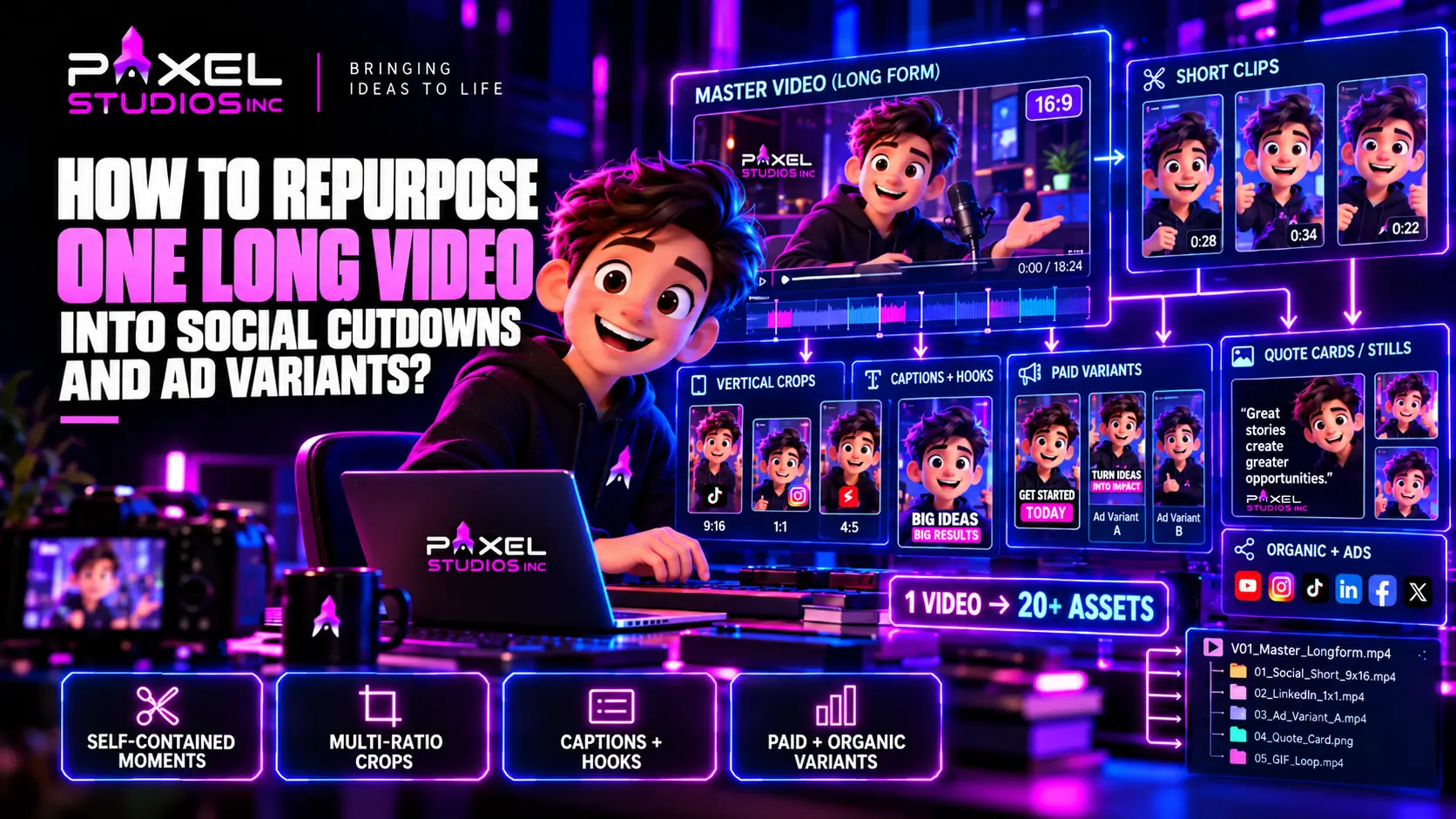
A single 20-minute video can yield twenty or more distribution assets, and the derivative work typically takes 8 to 16 hours against the 100-plus hours those pieces would need if produced individually, according to a 2026 repurposing workflow from Digitelia. That ratio is the entire argument. Most brands already own the footage they need for a quarter of social output, and video repurposing services exist to get it out. What they lack is a system for extracting it.
Why Most Repurposing Produces Weak Assets?
The common approach is to finish a long video, then ask an editor to pull some clips from it. The results are predictably mediocre, for three structural reasons.
The long video was written as a single arc, so its strongest moments depend on setup that a 30-second clip cannot carry. The framing was composed for 16:9, so a vertical crop either loses the subject or sits awkwardly. And the message lives in the audio, so a muted feed viewer gets nothing.
Video repurposing services work best when the long piece is built with extraction in mind. That changes the script, the shoot, and the edit, and it costs almost nothing extra at the planning stage.
Introduce Your Script
To The World With Our
Explainer Videos

Plan Extraction Before Production
Write Self-Contained Moments Into the Script
The single highest-leverage change is scripting deliberate standalone segments inside the long piece. Each one states its own premise, makes one point, and resolves, in 20 to 60 seconds. In a long-form interview, this means asking questions designed to produce complete answers. In a scripted piece, it means structuring sections so each opens with its own hook.
A long video containing eight self-contained moments yields eight strong clips. One written as a continuous argument yields eight weak fragments.
Shoot for Multiple Crops
Framing is the other pre-production decision. Composing with a vertical safe area in mind, keeping the subject centred rather than hard to one side, and shooting slightly wider than the 16:9 frame requires all give an editor room to reframe without losing the subject.
For a two-camera setup, dedicating one camera to a tighter, centred frame makes vertical extraction close to free. Video resizing from a well-framed master is a reframe. Video resizing from a badly framed one is a compromise on every clip.
Capture Supporting Material
A shoot that captures only the main performance limits what repurposing can produce. Fifteen extra minutes gathering b-roll, product detail shots, environment views, and a few deliberate silent moments gives an editor the material to build clips that are more than a talking head in a box.
The Asset Map: What One Long Video Yields?
| Asset type | Typical count | Length | Primary placement |
| Full long-form edit | 1 | Full runtime | Website, YouTube |
| Vertical full edit | 1 | Full runtime | Mobile-first placements |
| Short clips | 3 to 6 | 20 to 90 sec | TikTok, Reels, Shorts |
| Professional excerpts | 3 to 5 | 45 to 90 sec | |
| Paid ad variants | 3 to 6 | 6 to 30 sec | Paid social, pre-roll |
| Quote cards with motion | 3 to 5 | 10 to 20 sec | Feed and stories |
| Looping GIFs | 2 to 4 | 3 to 6 sec | Email, web, messaging |
| Audiograms | 2 to 3 | 30 to 60 sec | Podcast and audio-led feeds |
| Stills and frames | 5 to 10 | n/a | Thumbnails, decks, articles |
Counts scale with source length and density. A dense 20-minute interview supports the upper end. A tightly scripted 3-minute brand piece supports perhaps a third of it.
Distinguish Organic Clips From Paid Variants
Video repurposing services deliver two distinct products from the same master, and the brief should name which one each asset is. The counts in the table above mix both, so a package quoted without that split tends to arrive weighted toward whichever kind the editor found easiest to pull.
These are different products, and briefing them identically is the most common mistake in the whole process.
Organic social media cutdowns reward substance. Social media cutdowns released organically are chosen by the viewer rather than pushed at them. A viewer scrolling a feed will give a useful 60-second clip their attention, and the clip’s job is to be worth watching.
Paid ad variants reward compression. A cold viewer gave no permission, so the asset has three seconds to earn attention and should drive one specific action. These run shorter, open harder, and need a clear call to action.
Pulling a 60-second organic clip and running it as a paid ad usually underperforms a purpose-built 15-second version of the same idea. The platform-by-platform length logic sits in the guide to animated ad length, and the testing cadence that paid variants feed into is covered in the guide to choosing an animated video ad agency.
The Extraction Workflow
A repeatable sequence keeps video repurposing services from becoming improvisation.
- Review and log. Watch the master and timecode every usable moment with a one-line description and a rating.
- Cluster by theme. Group logged moments so each cluster becomes a clip with a single point.
- Cut the shortest version first. Build the tightest viable cut of each idea, then extend for longer placements.
- Reframe. Produce the required ratios, checking subject position and safe areas on each.
- Add the graphics layer. Captions, hook text, lower thirds, end cards, per ratio.
- Trim colour and audio. Lift shadows and strengthen contrast for mobile viewing; normalise levels per platform.
- Export to spec. Resolution, frame rate, bitrate, and caption format per destination.
- Log and name. A naming convention that encodes clip, length, ratio, and version.
Step three is the one teams skip and the one that determines quality. A clip cut at 60 seconds and squeezed to 15 loses coherence. A clip built at 15 and extended to 60 holds together at both lengths.
Naming and Versioning
A campaign producing thirty assets needs a convention, or the media team cannot tell which file is which. Something like brandname_clip03_hookB_15s_9x16_v2 is unglamorous and solves a real problem. Teams running paid tests also need the hook variable encoded in the filename, since that is how creative performance gets attributed back to a decision.
Reframing Without Wrecking the Shot
Video resizing is where quality quietly drains out of a repurposing project.
Centre of interest, not centre of frame. An automatic centre crop cuts the subject in half when they sit off-centre. Reframing follows the subject.
Animated reframes for moving subjects. A slow pan within the crop tracks a subject who moves, rather than letting them drift out.
Designed backgrounds over letterboxing. Where a 16:9 shot cannot fill a vertical frame, a branded panel above and below reads as deliberate. Black bars read as lazy. The design system for those panels belongs to the graphics layer, and the element types involved are covered in the guide to motion graphics video editing.
Safe areas per platform. Interface elements cover the edges of a vertical frame. Captions placed in the lower third of a 9:16 export frequently sit behind a platform’s own controls.
Resolution discipline. Cropping a 1080p master to vertical leaves roughly 600 pixels of width. Shooting or finishing in 4K gives genuine headroom for crops, which is the strongest practical argument for a 4K master even on projects delivering only in HD.
The Graphics Layer Does the Heavy Lifting
Most repurposed assets are consumed muted, which makes on-screen text the primary channel rather than a support.
What the graphics layer needs to carry:
- Burned-in captions, styled to the brand rather than platform defaults
- An opening hook line, landing inside the first second and a half
- Context the clip lost, such as the speaker’s name and the question being answered
- A call to action, for paid variants especially
- Persistent brand mark, so a clip stripped of its intro still reads as yours
Every one of these needs rebuilding per aspect ratio. A caption sized for 16:9 is too small vertically; a hook line positioned for a horizontal frame sits wrong in a square. Motion graphics editing is therefore the single largest variable in how fast a batch can be produced. Motion graphics editing templates built across all four ratios turn this from a redesign into a text swap, which is the difference between a repurposing programme that scales and one that stalls at the fifth asset.
What Repurposing Cannot Fix?
Some things do not survive extraction, and knowing them before commissioning video repurposing services prevents wasted hours.
A long piece with no distinct moments. If the argument only works end to end, clips will feel like fragments.
Footage framed hard to one side throughout. No reframe recovers a subject sitting at the edge of every shot.
Audio-only value. A segment whose entire worth is in a verbal nuance will not read muted, no matter how good the captions.
Low-resolution masters. A 1080p source cannot produce a clean vertical crop at platform-native resolution.
Dated content in the spoken track. A presenter saying a price or a quarter aloud makes every derivative expire with it. Changeable facts belong in the graphics layer, where they can be updated in minutes rather than reshot. Scripting around this costs nothing at the writing stage and extends the usable life of every clip the shoot produces, often by a year or more.
Budget and Turnaround
Repurposing is priced per asset or as a package, and the package is almost always better value.
| Scope | Typical effort | Notes |
| Light: 3 clips, 2 ratios each | 1 to 2 days | Suits a single social push |
| Standard: 8 clips, 3 ratios, captions | 4 to 7 days | Typical quarterly package |
| Full: 20+ assets, 4 ratios, paid variants | 2 to 3 weeks | Campaign-scale output |
| Template system build | 1 to 2 weeks, once | Amortises across every future batch |
Priced per asset, a twenty-asset batch looks expensive. Priced as a package drawing on a template system, the marginal cost of asset fifteen is a fraction of asset one. This curve mirrors the cutdown economics set out in the guide to animated commercial cost, and the same logic applies: commission the full list at once rather than returning for versions later. Broader rate benchmarks for this kind of work sit in the video editing cost guide.
Briefing a Repurposing Team
Vague briefs produce generic clips. Supply these and the output improves sharply:
- The master file at full resolution, plus project files if graphics need to match
- A platform and ratio list, with required lengths per platform
- The asset count you want, by type
- Brand assets: typefaces, colour values, logo files, caption styling
- Which moments matter, if you already know, with timecodes
- The action each paid variant should drive
- Naming convention, if your media team uses one
Point five saves the most time. A marketer who watched the shoot knows which forty seconds are gold. An editor discovering that independently spends hours, and those hours are billed at the same rate as the creative work they displace. Ten minutes of timecoded notes from someone who was in the room is the cheapest quality improvement available on the whole project.
Build It In-House or Buy It
Routine extraction sits comfortably in-house once a template system exists. A marketer with a template set and basic editing skills can produce a week of clips from a logged master.
Video repurposing services earn their cost in three situations: the first template system build, which needs design capability; high-volume campaign work with a deadline; and anything needing reframing beyond a simple crop, such as animated tracking, compositing out a background element, or rebuilding a graphics system across ratios. Video editing services bought by the batch also suit teams whose output is seasonal rather than continuous.
A hybrid is where most mature teams land: a studio builds the system and the flagship batch, and the internal team produces routine clips against it. For that split to work, the handover has to include the template files and a documented style guide rather than only rendered exports.
Content Repurposing as a Standing Programme
Treated as a one-off job, repurposing produces a batch of clips and stops. Treated as a programme, content repurposing becomes the mechanism that keeps a social calendar fed without commissioning new shoots every month.
The shift is mostly scheduling. A brand filming one substantial piece per quarter, with extraction planned into each, can run a continuous calendar from four shoot days a year. The quarterly rhythm that works:
- Week one: shoot the long-form piece, capturing supporting material and multiple framings.
- Weeks two and three: finish the master, then run the extraction workflow across the full asset map.
- Weeks four to twelve: release on a schedule, holding back a reserve of assets for gaps.
- Ongoing: log which clips performed, and let that inform what the next shoot deliberately captures.
Step four is what separates a programme from a production line. Content repurposing improves when performance data feeds back into the script, because the team learns which kinds of moments travel and writes more of them into the next piece.
Where Heavier Post Work Enters?
Most repurposing is editorial and graphics work. Occasionally it needs more.
Background replacement on a clip whose original framing cannot be cropped, removal of a dated product or a departed presenter, or a logo swap after a rebrand all cross into video compositing rather than editing. VFX services priced per shot apply here, and the cost is modest for simple cases such as a screen replacement or a sign removal. What makes video compositing expensive in a repurposing context is retrofitting it onto footage shot without it in mind, which is the same constraint described in the guide to video compositing.
VFX services are worth scoping at the master edit stage rather than per clip. A product replacement done once on the master propagates to every derivative automatically. The same fix applied clip by clip is paid for repeatedly.
Buying It as Part of a Scope
A post-production company handling the master edit and the repurposing batch together tends to produce better derivatives than a separate vendor receiving a finished file, because the team already knows the footage, holds the project files, and can pull alternative takes that never made the master. A post-production company coming to it cold has only the flattened export to work from.
Video editing services bought as a package covering master plus derivatives also avoid the version-control problem that appears when two suppliers hold different cuts of the same material.
Common Mistakes
Treating repurposing as an afterthought. The decisions that make it work happen before the shoot.
Auto-cropping everything. Centre crops cut subjects in half.
One length per platform. Cold and retargeting audiences need different lengths on the same platform.
Letterboxing instead of designing. Black bars signal that the asset was an afterthought.
Platform-default captions. They break brand consistency and often sit in unsafe areas.
No naming convention. Thirty files called final_v2 is a media team’s nightmare.
Forgetting the colour trim. A grade for a dark edit suite reads muddy on a phone in daylight, as the comparison of colour grading vs colour correction explains.
Reusing the hero clip as every paid variant. Testing needs variants that differ in one deliberate dimension.
Putting the System in Place
Video repurposing services deliver their value through a system rather than a service call, and the system is cheap to build once and expensive to improvise every quarter. The system has four parts: long-form pieces written with self-contained moments, shooting and framing that anticipate multiple crops, a template set covering every ratio, and a logged extraction workflow that produces the shortest cut first.
With all four of those in place, a single shoot each quarter can carry an entire social calendar, and the marginal cost of each new asset falls to very close to nothing. Without them, every batch of clips is a fresh negotiation, and the assets that emerge are fragments of something that was never designed to be taken apart.
Pixel Studios Inc. builds repurposing systems rather than one-off clip batches, with ratio templates, caption styling, and paid variants planned from the master edit, supported by its video editing, motion graphics, and social media animation capability.
Introduce Your Script
To The World With Our
Explainer Videos
Frequently Asked Question?
How many assets can one long video realistically produce?
A dense 20-minute piece can yield twenty or more distribution assets across clips, excerpts, ad variants, quote cards, GIFs, and stills. A tightly scripted 3-minute brand video supports perhaps a third of that.
Should clips be cut long and trimmed, or short and extended?
Short and extended. A clip built at 15 seconds as a complete idea holds together when stretched to 60. One cut at 60 and squeezed to 15 usually loses the setup its point depended on.
What resolution should the master be to support vertical crops?
4K wherever possible. Cropping a 1080p master to 9:16 leaves roughly 600 pixels of width, which is below platform-native resolution for most vertical placements.
Are organic clips and paid ad variants the same thing?
No. Organic clips reward substance and can run longer, since the viewer chose to watch. Paid variants face a cold audience, need a hook inside the first seconds, run shorter, and should drive one specific action.
Can repurposing be done in-house?
Routine extraction can, once a template system covering every aspect ratio exists. The system build, high-volume campaign batches, and anything needing animated reframing or background work usually benefit from a studio.

