
Each question your product page leaves unanswered gives a shopper a reason to leave.
When Wyzowl asked consumers how they would most like to learn about a product, 78% picked a short video. Text articles got 9%. Sales calls got 2%. That gap explains why product animation for ecommerce has gone from a launch extra to a working part of the product page. Shoppers arrive with questions about size, function, materials, and setup, and every unanswered one sends them back to the search results. Below is a method for finding those questions, matching each one to an animated answer, and placing it where the doubt appears.
The Questions Shoppers Ask in the Last Ten Seconds
An online shopper can’t lift the product, open it, or try it on. Everything they would learn by handling it in a store has to come from the page. When the page falls short, they guess. Some guess right and buy. Others guess wrong, buy anyway, and send the item back.
The National Retail Federation expected consumers to return $849.9 billion in merchandise in 2025, about 15.8% of purchases. Many of those returns began as a question the product page never answered. “I thought it would be bigger.” “I didn’t realize it needed a hub.” “The lid was harder to remove than it looked.”
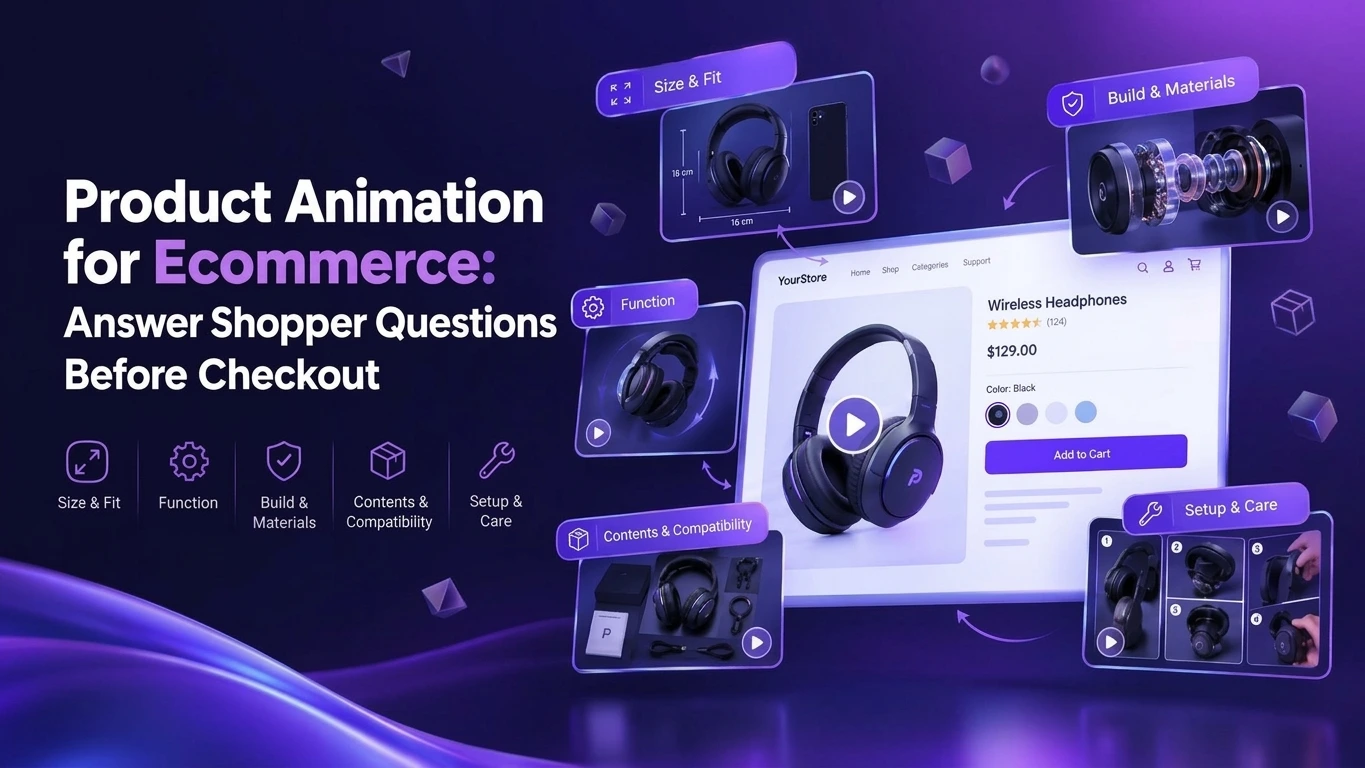
Almost every pre-checkout doubt falls into one of five families:
- Size and fit: Will it fit my space, my body, my bag, my car?
- Function: What does it do, and how does it do it?
- Build and materials: Is it well made, and will it last?
- Compatibility and contents: Will it work with what I own, and what comes in the box?
- Setup and care: How hard is it to assemble, use, clean, and maintain?
Photography handles some of these well. It struggles with function, internal quality, and anything that unfolds over time. Those are the gaps ecommerce product animation fills best.
Introduce Your Script
To The World With Our
Explainer Videos

The Pre-Checkout Question Map
The Pre-Checkout Question Map pairs each question family with the animated answer that resolves it and the spot on the page where it does the most good. Use it as the planning grid for product animation for ecommerce on any SKU.
| Question family | What the shopper is really asking | Animated answer | Where it belongs |
| Size and fit | “Will this work in my life?” | Scale comparison against everyday objects | Gallery, slot two |
| Function | “What happens when I use it?” | Animated product demonstrations of the core action | Beside the variant selector |
| Build and materials | “Is this worth the price?” | Exploded view, slow material close-ups | Below the description |
| Compatibility and contents | “Will I need anything else?” | Unboxing and connection sequence | Specs section |
| Setup and care | “Will this be a hassle?” | Setup and cleaning walkthrough | FAQ accordion and post-purchase email |
Size and Fit: Give Shoppers a Reference Point
Dimensions in a spec table are abstract. A stroller folding down beside a car trunk, a backpack swallowing a 16-inch laptop, or a desk lamp next to a coffee mug turns numbers into something a shopper can picture. Short scale clips built with 3D product visualization are cheap to produce once a model exists, and they target one of the most common reasons shoppers give for sending items back.
Function: Show the Moment That Matters
Every product has one moment that proves it works: the blender pulling ice into the blades, the smart lock bolt retracting, the jacket’s hood stowing into the collar. Animated product demos isolate that moment, slow it down, and repeat it from the angle that explains it best. This is where 3D product animation beats video shot on a set, because the camera can move through a housing or freeze mid-action without a cut. Animated product demonstrations built this way often become the most-watched asset on the entire page.
Build and Materials: Prove the Price
Premium pricing needs visible proof. An exploded view animation shows the parts that justify the cost, such as a steel frame under the upholstery or a sealed bearing inside the wheel hub. Slow close-ups of stitching, grain, and finish do the same for soft goods. Good product visualization makes the price feel earned before the shopper reaches the cart.
Compatibility and Contents: Remove the Surprise
“Batteries not included” belongs in the video, along with everything else that ships in the box. A ten-second unboxing animation that lays out every component, followed by a quick connection sequence, removes one of the most frustrating post-purchase surprises and cuts the “does this work with” tickets.
Setup and Care: Lower the Effort Barrier
Shoppers avoid products that look like work. A 30-second assembly sequence showing four steps and no tools can win a sale that a 40-page manual would lose. Cleaning and maintenance loops do the same for appliances, cookware, and anything with a filter.
Your Support Inbox Is Already a Storyboard
You don’t need to guess which questions to answer. Your customers have been writing them down for you. Here is how to turn that data into a shot list in a single afternoon.
- Export 90 days of pre-purchase support tickets and chat logs. Filter for messages sent before an order exists.
- Read every one-, two-, and three-star review. Note complaints that start with “I thought” or “I didn’t realize.”
- Pull return reason codes and free-text notes. Group them by product and by question family.
- Check on-site search queries. Searches such as “dishwasher safe” or “fits queen bed” show doubts your product pages miss.
- Read marketplace Q&A sections. Amazon’s customer questions are a free, ranked list of what shoppers want to know.
- Score each question by frequency and revenue. A question asked weekly on your best-selling SKU outranks one asked monthly on a slow mover.
The top five questions per product become the script for your product animation for ecommerce. This is also where the business case gets easier to make: Wyzowl reports that 62% of video marketers say video has helped them reduce support queries. Brands that want help running this audit and turning it into a production plan can see how we approach it on our ecommerce video production services page.
Where Should Product Videos Sit on the Page?
Placement decides how much product animation videos can do. A great clip buried under the reviews answers nothing, so match each video to the spot where its question comes up.
| Placement | Job | Length | Production notes |
| Gallery, slot two | Show the product in motion right after the hero image | 6 to 15 seconds | Muted autoplay loop, no reliance on audio |
| Beside the variant selector | Show the selected color or size in motion | 3 to 8 seconds per variant | Swaps when the shopper changes options |
| Description block | Explain the core function | 30 to 60 seconds | Burned-in captions, clear first frame |
| FAQ accordion | Answer one specific objection | 10 to 20 seconds | One question per clip |
| Cart or checkout | Reassure on setup or returns | 5 to 10 seconds | Lightweight, never blocks the buy button |
| Post-purchase email | Teach setup and care | 30 to 90 seconds | Cuts “how do I” tickets and avoidable returns |
Two technical points matter as much as the creative. First, most product page traffic is mobile, so design for vertical or square framing and make sure nothing depends on sound. Second, product videos for online stores have to load fast, and heavy files slow a page down. Lazy-load anything below the fold, use a lightweight poster frame, and host files on a platform that adapts bitrate to the connection. For length benchmarks across placements and channels, this guide to ideal animated video length is a useful reference.
Why Animate the Product Instead of Filming It?
Live footage still works well for lifestyle shots and real people using a product. Animation wins on the jobs a camera handles badly, and for most product videos for ecommerce brands the smartest plan uses both.
- Variants from one model. Twelve colorways render from a single 3D asset, while a shoot needs twelve samples on set.
- Impossible angles. The camera can pass through a housing, slice a mattress in half, or freeze a pour mid-air.
- Pre-launch assets. Product videos for online stores can go live for pre-orders before inventory arrives.
- Catalog consistency. Lighting, angles, and pacing stay identical across hundreds of SKUs.
- Cheaper updates. A new color or a revised part means editing the model, with no reshoot.
That flexibility is why 3D product visualization now sits behind many listings that shoppers assume were photographed. If you’re weighing the formats side by side, our comparison of product rendering vs animation vs photography breaks down cost and best use for each, and as being the best 3d animation company we are offering full range of services from character to product animation
What Goes Into an Ecommerce Product Animation Brief?
A good brief is short and specific. Studios can quote accurately and move fast when they receive these seven items on day one:
- A ranked SKU list. Start with the products where your question audit found the most doubt.
- The top questions per SKU. One line each, written the way customers phrase them.
- Source data. CAD files if they exist. If they don’t, a physical sample, exact dimensions, and photos from six angles. Accurate 3D product visualization starts with accurate inputs.
- Brand and material references. Color codes, finish samples, and two or three ecommerce product videos you admire, with a note on what works in each.
- Placements and formats. Gallery loop, description clip, FAQ clips, and setup video, with the aspect ratio for each (1:1, 4:5, 9:16, 16:9).
- Marketplace requirements. Amazon, Walmart, and Shopify each set their own video specs and content rules, so list every destination up front.
- Success metrics. The baseline numbers you will compare against after launch.
Brands that hand over all seven usually see a first animatic within two weeks. If your team is new to the format, a primer on what 3D product animation involves makes every round of feedback faster, because reviewers know which stage they’re looking at and what can still change.
How Do You Know It’s Working?
Measure the questions, not just the clicks. Ecommerce product videos earn their place when they change what shoppers do and what they stop asking.
| Metric | What it tells you | Where to find it |
| Product page conversion rate | Does the video help shoppers commit? | Analytics, A/B test split |
| Add-to-cart rate | Does it move people past the first hesitation? | Analytics events |
| Video play and completion rate | Do shoppers watch the answer at all? | Video host or player analytics |
| Return rate by reason code | Are “not as expected” returns falling? | Returns platform, OMS |
| Pre-purchase support contacts per 1,000 sessions | Are the targeted questions disappearing? | Helpdesk tags |
Product animation for ecommerce should be tested like any other conversion change, so run a proper split test. Show the animated version to half your traffic and the existing page to the other half for at least four weeks, or until results reach statistical significance. Tag support tickets by question family before launch, so you have a clean baseline to compare against.
Three Mistakes That Waste a Product Video Budget
Most underperforming ecommerce product videos fail for one of three reasons. Each has a simple fix.
Mistake 1: Making an Ad When the Page Needs an Answer
A cinematic 60-second brand film with swelling music and a slow reveal can look great on social and still do almost nothing on a product page. By the time a shopper reaches the listing, they’ve already been persuaded to look. Now they need facts. Keep the brand films for paid channels and put plain, specific answers on the product page.
Mistake 2: Forcing One Master Video Into Every Placement
A single 90-second video dropped into the gallery, the description, and the cart answers no question well in any of them. Plan a master render and a set of cutdowns at the start, with each cutdown tied to one question and one placement. The extra edits cost little compared with the model and render work you’ve already paid for, and short product animation videos cut for each spot will outperform one long film every time.
Mistake 3: Animating the Wrong Products First
A $12 phone case that shoppers understand at a glance gains little from product animation for ecommerce. Start where doubt is expensive: high-price SKUs, products with high return rates, and anything with moving parts or assembly. Use the support-inbox audit to rank them, and our guide to 3D product animation cost will help you size a pilot for the top five.
Scaling to a Full Catalog
Once the pilot proves itself, scale comes from systems. Build a shared library of environments, lighting rigs, and camera moves, then reuse them across every SKU so each new product costs less than the last. Product videos for ecommerce brands with hundreds of listings often follow a tiered model: full animated product demonstrations for hero products, shorter function loops for mid-range items, and a simple turntable for the long tail.
Repurposing multiplies the return. The same renders that answer questions on the product page can be recut as vertical clips for paid social, marketplace listing videos, and retargeting ads, and our social media animation team handles those formats from the same source files. One well-planned model can feed a whole year of content for that product, which is why product videos for ecommerce brands are increasingly planned as libraries instead of one-off shoots.
Turn Shopper Questions Into Sales
Your customers have already told you what stops them from buying. Pixel Studios Inc. turns those questions into product animation for ecommerce that answers each one at the moment it comes up, from gallery loops to setup walkthroughs, all built from a single accurate model. See how we plan and produce listing assets on our ecommerce video production services page.
Ready to start? Book a free product page audit and send us your top five SKUs. We’ll map their open questions with the Pre-Checkout Question Map and show you which animations will do the most for conversion and returns.
Introduce Your Script
To The World With Our
Explainer Videos
Frequently Asked Question?
What is product animation for ecommerce?
Product animation for ecommerce is computer-generated video that shows how a product looks, works, fits, and assembles, created for product pages, marketplaces, and online ads. It is usually built from a 3D model, which allows close-ups, cutaways, and colorway changes that are difficult or costly to film.
Does ecommerce product animation reduce returns?
It can, when it targets the reasons customers send items back. Returns driven by size, function, or missing-component surprises fall when the page shows those details clearly before purchase. Track return reason codes before and after launch to measure the effect on your own catalog.
How long should product animation videos be?
Match length to placement. Gallery loops work best at 6 to 15 seconds, function explainers at 30 to 60 seconds, and setup or care walkthroughs at 30 to 90 seconds. Keep every clip focused on one question so shoppers get the answer before they scroll past it.
Are animated product demos better than live-action product videos?
They do different jobs. Animated product demos excel at showing internal parts, function, scale, and every variant from one model. Live action works better for lifestyle context and showing real people using the product. Many brands combine both on the same page.
Which product videos for online stores should a brand create first?
Start with your highest-revenue products that also generate the most pre-purchase questions or returns. Build a short gallery loop and one function clip for each, measure the impact over four to six weeks, and expand to setup videos and more SKUs once the numbers support it.

