
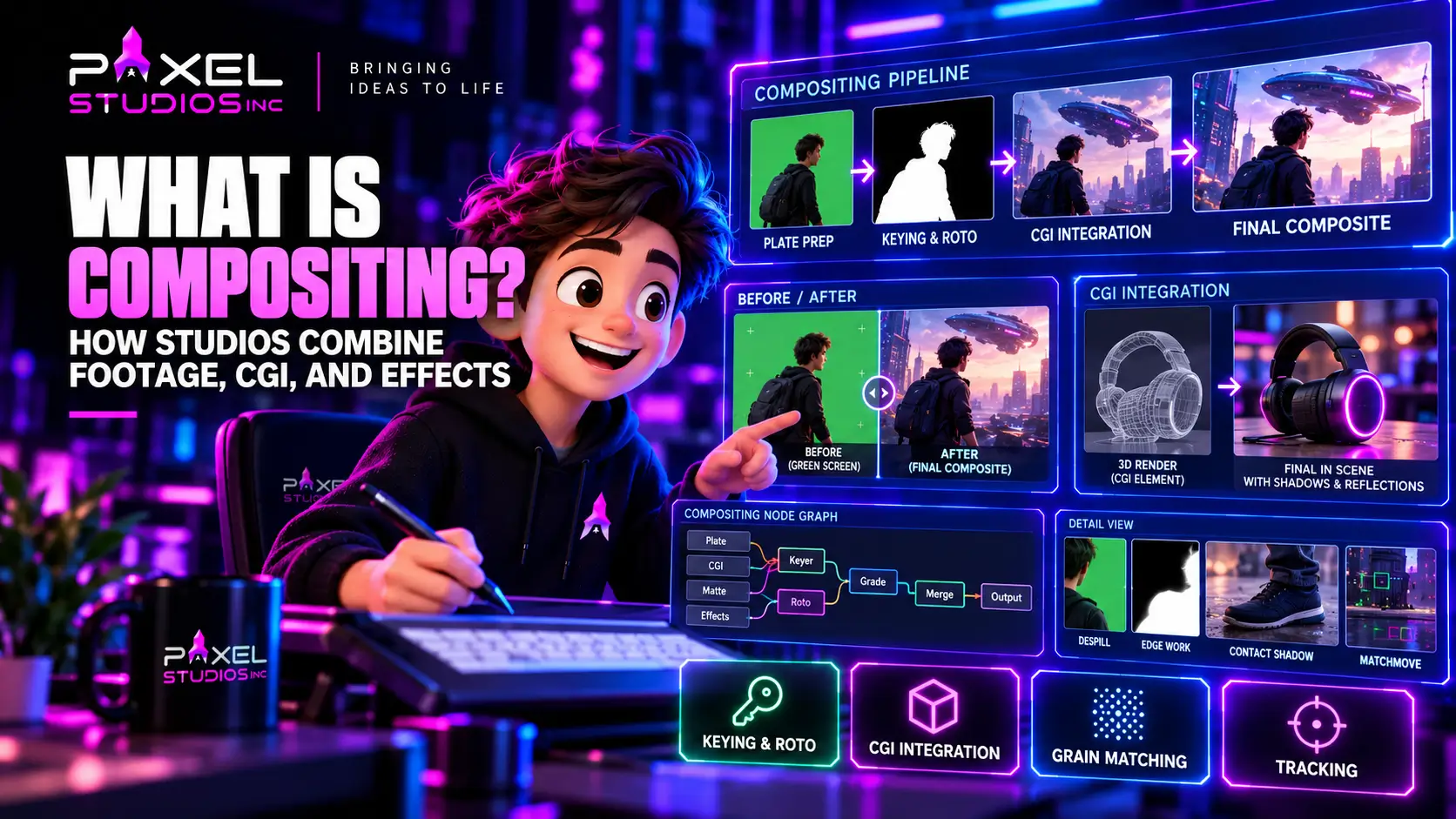
Video compositing is the craft of combining separately created images into one frame that reads as a single photograph. It is the stage where a green screen performance meets a digital environment, where a rendered product lands on a real desk, where a sky replacement stops looking like a sky replacement. An unevenly lit green screen can need dozens of combined keys to separate cleanly, which is why compositing is a specialist discipline rather than a button in an editing timeline.
The Job in One Sentence
A composite succeeds when a viewer cannot identify which parts of the frame were photographed and which were built.
That sounds modest and is extremely demanding, and it is the standard every video compositing decision gets measured against. Human vision is tuned to detect inconsistency in light, edge, and texture. A foreground element lit from the wrong side, an edge that is slightly too sharp, a digital element with no grain sitting on a grainy plate: each registers as wrong before a viewer can explain why. Most of a compositor’s work goes into the properties nobody consciously notices.
Introduce Your Script
To The World With Our
Explainer Videos

Where Compositing Sits in the Pipeline?
Compositing is the integration layer near the end of the visual effects pipeline. Everything upstream produces components. Compositing assembles them.
The order on a typical shot:
- Plate preparation. The photographed footage is stabilised, cleaned, and prepared.
- Matte creation. Keying and rotoscoping separate foreground from background.
- Element assembly. Rendered computer-generated layers, stock elements, and additional plates arrive.
- Integration. Colour, contrast, light, grain, and edges are matched across every layer.
- Final output. The composite is rendered at delivery resolution in the correct colour space.
That sequence sits inside the broader post sequence of ingest, editorial, colour, sound, and delivery mapped in the guide to video post production. Compositing depends on picture lock upstream and feeds grading and finishing downstream.
Green Screen Compositing, Step by Step
Most video compositing techniques appear somewhere in a green screen shot, which makes it the clearest teaching case.
Green screen compositing is the most familiar form of the work and a useful way to walk through the craft, since nearly every technique in compositing appears somewhere in it.
Building the Matte
A matte is the greyscale image defining what foreground is and what is background. White keeps, black discards, grey holds partial transparency.
The naive approach uses one keyer set to the green value. Real footage defeats that immediately. A screen lit unevenly across its width, a shadow falling across one corner, a reflective costume picking up green bounce: each region needs different treatment. Professional practice combines multiple keys, each tuned to a specific region or difficulty, then merges them into one matte.
Rotoscoping handles what no key can reach. A hand passing in front of a green-lit wall, a prop whose colour sits too close to the screen, motion blur across a fast-moving limb. Roto is manual, frame-by-frame work, and it remains the most labour-intensive task in the discipline.
Despill
Green screens reflect green light onto everything near them. Skin picks up a green cast along the jaw, blonde hair turns faintly green at the tips, a white shirt goes slightly sick.
Despill removes that contamination while preserving the original colour underneath. Complex shots need several despill passes, each targeting a different material, because the correction that fixes skin will damage hair and the one that fixes hair will flatten fabric. Over-despilling produces magenta fringing, which is as obvious a tell as the spill it replaced.
Edge Treatment
Edges are where composites are won and lost. A matte that is technically accurate can still look cut out because the edge is too hard, too clean, or missing the semi-transparency real optics produce.
The edge toolkit includes extending edges where the key eroded them, painting edges by hand where detail was lost, patching regions the key could not hold, and preserving the partial transparency of hair and fine detail. Hair is the standard difficulty benchmark, since a convincing head of hair against a new background requires both a soft matte and deliberate edge reconstruction.
Color and Tonal Integration
Once the element is separated, it has to belong in its new environment. Integration matches contrast, value, and colour to the background, and accounts for the properties of the lens that shot the plate: diffusion, black level lift, exposure character, and optical artefacts.
The specific checks a compositor runs:
- Do the black levels of the element match the plate, or is it sitting too contrasty?
- Does the light direction on the element agree with the light in the environment?
- Does the element pick up color bounce from its surroundings, as a real object would?
- Is there atmospheric haze between the element and the camera at that distance?
- Does the depth of field on the element match the plate at that distance?
Grain Matching
Every camera produces a texture. Digital sensors produce noise, film produces grain, and both vary with exposure and ISO. A rendered element arrives perfectly clean, which makes it conspicuous against a textured plate.
Grain workflows degrain the plate, composite the clean element, then reapply matched grain across the whole frame so every layer shares one texture. Skipping this step is one of the fastest ways to make expensive work look cheap.
CGI Integration
CGI integration is compositing’s hardest case, because the element has no photographic reality to inherit.
A rendered object arrives as multiple passes rather than one image: diffuse, specular, reflection, shadow, ambient occlusion, depth, and often motion vectors. Delivering renders in passes is deliberate. It lets the compositor adjust the strength of a reflection or the density of a shadow without returning to the render queue, which would cost hours.
Shadow and Contact
The single most common failure in CGI integration is the absence of convincing contact. An object that casts no shadow, or casts a uniform soft shadow where a real object would produce a dark contact point fading outward, reads as floating regardless of how well it is modelled.
Contact shadows, ambient occlusion where surfaces meet, and bounce light from the surface beneath are what plant an object in a scene. Product work depends heavily on this, which is why most 3D product animation company delivered for compositing into live footage ships with separate shadow and occlusion passes as standard.
Tracking and Matchmove
A computer-generated element has to move with the camera. Tracking solves the camera’s motion from the footage so the element can be placed in a matching virtual space. Handheld shots, long lenses, and plates with little visual texture make this harder, and a failed track means the element slides against the plate in a way viewers notice immediately, even on a single pass.
This is where shoot preparation pays off most. Tracking markers, a measured set, lens data, and a reference sphere for lighting make a track routine. Their absence can turn a one-day shot into a one-week shot.
Reflection and Interaction
Real objects affect their surroundings. A metallic product on a glossy table reflects into it. A character standing in a puddle appears inverted below. These interactions are built in compositing, usually with additional renders and hand-placed elements, and their presence separates a competent composite from a convincing one.
The Node-Based Workflow
Video compositing software is node-based rather than layer-based. Each operation is a node, and nodes connect into a tree showing how images flow and combine.
The reason is control. A layer stack forces a fixed order. A node tree lets a compositor branch an image, process the branches differently, and recombine them, which is exactly what multi-key matte construction requires.
Tree discipline matters as much as technique. A shot might carry several hundred nodes, and a tree organized modularly, with labelled sections and logical flow, stays workable when a client note arrives three weeks later. A disorganized tree becomes unmaintainable, and the compositor who inherits it often rebuilds rather than untangles.
Matching Precision to the Deliverable
Not every shot needs feature-film rigor, and applying it indiscriminately wastes money.
| Deliverable | Typical precision demanded |
| Social and web advertising | Fast turnaround, forgiving viewing conditions, moderate edge work |
| Broadcast and connected television | Clean keys, consistent grain, quality-control compliance |
| Episodic television | Detailed edge work, consistent look across many shots |
| Feature film | Maximum detail, scrutinized on a large screen at high resolution |
Viewing conditions drive this. A composite viewed on a phone in a bright room forgives soft edge work that would be glaring projected at cinema scale. A professional scopes the precision to where the shot will be seen, which is a budget decision as much as a craft one.
What the Shoot Owes the Composite?
Compositing problems are usually production problems arriving late. A plate shot without compositing in mind costs multiples to fix.
A shoot supporting compositing should supply:
- An evenly lit screen, with the subject far enough from it to limit spill
- Separation lighting on the subject, so the edge is defined against the screen
- Tracking markers on the screen, placed to stay visible through the action
- Clean plates: the same shot without the subject, for reference and patching
- Lens and camera data: focal length, sensor, filtration, height, tilt
- Lighting reference: a chrome and grey sphere, plus a colour chart
- Set measurements for anything that needs to be rebuilt digitally
That list takes minutes on set and saves days in post. Its absence is the most common reason compositing quotes come back higher than a producer expected, and it is why effects methodology belongs in pre-production rather than post. The wider trade-off between photographed and designed approaches is mapped in the comparison of VFX vs motion graphics.
Where Compositing Appears in Commercial Work?
Feature effects dominate the conversation, and most compositing is commercial and routine.
Screen replacement. Filmed monitors produce moiré and flicker and show the wrong content. Screens get shot blank and tracked, with the interface composited in. Universal in software and device marketing.
Set extension. A rooftop interview acquires a skyline. A small studio becomes a hangar. Production value that building the real thing could not justify.
Clean-up. Boom microphones, crew reflections, modern signage in period scenes, competitor logos, safety equipment. Invisible work that rescues footage.
Product replacement. A packaging redesign lands after the shoot. The old pack gets tracked and replaced rather than reshooting the campaign.
Multi-plate assembly. Two takes combined so the best performance from each appears in one shot, common in dialogue and comedy.
Graphics integration. Placing designed elements into a frame with correct edges, transparency, and black levels is a compositing task even when the element is flat. The craft of building those elements is covered in the guide to motion graphics video editing, and motion graphics editing teams that understand compositing produce overlays that sit in the frame rather than on top of it.
How Compositing Interacts With Color?
A composite and a grade are mutually dependent. Elements are built to match a plate’s color character, so a substantial grade change after delivery can break the match and send shots back for adjustment.
Standard practice shares a reference look with the effects team early, grades a provisional look during the edit, and finalizes once composites land. Compositors work in a defined color space throughout, and finishing conforms the grade across plate and element together rather than separately. The relationship between the two color passes, and where effects review belongs in that sequence, is set out in the comparison of color grading vs color correction.
Where Compositing Sits in the Visual Effects Pipeline?
Video compositing is the last creative stage of the visual effects pipeline, and understanding what feeds it clarifies why briefs go wrong.
Upstream of compositing sit the departments that produce components. Modelling and texturing build assets. Rigging and animation move them. Lighting and rendering produce the passes. Simulation generates smoke, water, and destruction. Tracking solves the camera. Rotoscoping and paint prepare the plates. Every one of those hands its output to the compositor, who is the only person in the visual effects pipeline looking at the complete frame.
That position makes compositing the place where upstream shortcuts surface. A render delivered as a single flattened image rather than separate passes, a track solved loosely, a matte handed over with eroded edges: none of these look like problems in the department that produced them, and all of them become the compositor’s problem. A well-run pipeline treats compositing requirements as constraints on every upstream stage rather than as a cleanup step at the end.
Who Owns the Shot?
On larger productions, a visual effects supervisor owns the methodology, deciding how each shot will be achieved before the shoot happens, and a compositing supervisor owns consistency across shots so a sequence does not drift. On commercial projects, both roles frequently collapse into one senior compositor, which works provided that person is involved before production rather than handed plates afterward.
Buying Compositing Inside a Larger Scope
Most brands do not buy video compositing on its own. They buy a finished film, and compositing is a component inside it alongside editorial, color, graphics, and sound.
That has a practical consequence for procurement. A post-production company running all of those in one pipeline resolves the handover points internally: one color space, one timeline, one party accountable for integration. Buying video editing services, color, and compositing from three suppliers can work, and it needs the handover spec written down before anyone starts, including resolution, color space, frame range, naming, and which party conforms the grade across plate and element.
Motion graphics editing is worth naming explicitly in that scope. Designed elements placed over footage need the same edge, transparency, and black-level treatment as any other composited layer, so a graphics team working without compositing discipline tends to produce overlays that sit on the frame rather than in it. Where the two disciplines meet, and how VFX services should be scoped against graphics work, is covered in the comparison of VFX vs motion graphics.
Common Mistakes
Treating compositing as an editing task. Keying in a timeline produces a hard-edged, spill-contaminated result that reads as composited.
Shooting the plate without a methodology. No markers, no clean plates, no measurements, no lens data. Everything downstream becomes harder and slower.
Lighting the screen and not the subject. A perfectly lit screen with a flatly lit subject gives the keyer no edge to find.
Accepting single-pass renders. Without separate passes, every adjustment requires a re-render.
Ignoring grain. A clean element on a grainy plate is immediately visible.
Skipping contact shadow. The fastest way to make a well-modelled object look like it is floating.
Quoting from runtime. Compositing cost scales with shot count and difficulty. Thirty seconds could hold one easy shot or fifteen hard ones.
Changing the edit after compositing starts. Shots that no longer exist have been paid for, and shots that now exist were never built.
Buying Compositing Work
A few questions separate genuine in-house capability from subcontracted claims:
- Which shots in your reel were composited by your own team?
- Can you show clean-up and integration work, rather than only hero shots?
- Who writes the shot methodology, and will they join pre-production?
- How do you price revisions on a composite against revisions on a graphic?
- What color space will you work and deliver in?
- Do we receive the comp scripts and element passes, or only rendered shots?
Question two matters most. Hero shots show ambition. Clean-up and integration work show craft, because there is nowhere to hide in a shot whose only job is to look untouched.
VFX services should be quoted from a shot list with difficulty noted per shot. A vendor quoting compositing from a runtime has either not read the brief or is pricing defensively. For buyers purchasing editorial, color, and compositing together, a post-production company running one pipeline removes the color space and handover mismatches that split vendor arrangements tend to produce. Video editing services bought alongside compositing also keep the conform and finishing steps under one roof, which is where most integration failures surface.
Pixel Studios Inc. handles keying, roto, set extension, and CGI integration as part of one pipeline with editorial, color, and finishing, with shot methodology agreed before the shoot, supported by its 3D animation, motion graphics, and video editing capability.
Introduce Your Script
To The World With Our
Explainer Videos
Frequently Asked Question?
What is video compositing in simple terms?
It is the process of combining separately created images, such as filmed footage, computer-generated elements, and effects, into a single frame that looks like one photograph. The work succeeds when a viewer cannot tell which parts were filmed and which were built.
Why does green screen work need more than one key?
Because real screens are unevenly lit. Shadows, reflections, and bounce mean different regions of the frame need differently tuned keys, which are then merged into one matte, with rotoscoping covering what no key can separate.
What is despill and why does it matter?
Despill removes the green light a screen reflects onto the subject, which contaminates skin, hair, and light fabrics. Without it, a composited subject carries a green cast that gives the shot away. Over-applying it produces magenta fringing instead.
What does a shoot need to provide for good compositing?
An evenly lit screen with subject separation, tracking markers, clean plates, lens and camera data, lighting reference such as chrome and grey spheres, and set measurements. These take minutes on set and save days in post.
Why is compositing priced per shot rather than per minute?
Because difficulty varies enormously between shots. A locked-off plate with clean separation is quick, while the same effect on a handheld shot with motion blur, hair detail, and reflective surfaces can cost many times more.

